Offer deployment
Request a deployment of the commercial offer and follow the status of deployments.
Request a deployment of the commercial offer and follow the status of past deployments. A deployment is shared by every tenant: it does not depend on the header tenant.
Open Offer deployment in Admin →
Look up the deployments
The Offer deployments table shows, for each deployment, who requested it, the created date, the end date and the status. You can filter by User (the exact email) and by Status.
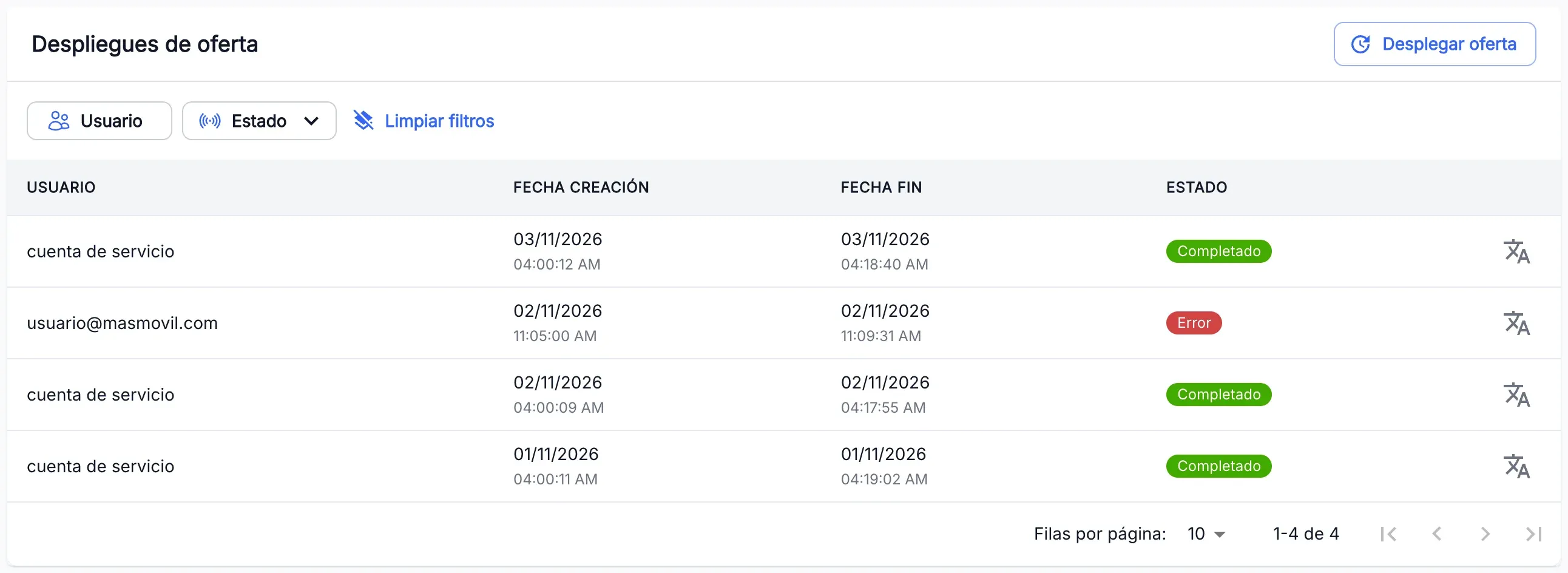
Press the status of a deployment to see its detail in Deployment status.
The table does not refresh on its own. To see whether a Running deployment has finished, reload the page or change page in the table.
The screenshots show the Admin interface in Spanish.
Deploy the offer
- Check that no deployment is Running. If one is, the Deploy offer button is disabled and the Offer deployment in progress notice appears.
- Press Deploy offer.
- In the confirmation, press Yes, I want to proceed. No, I want to cancel closes the window without deploying.
- The deployment appears in the table as Running. Reload the page to see when it becomes Completed.
If the request fails, Error deploying the offer opens: press Yes, I want to proceed to retry, or No, I want to cancel.
When something is not as expected
| You see | What it means and what to do |
|---|---|
| Deploy offer is disabled | A deployment is Running. Two cannot run at once: wait for it to finish and reload the page. |
| ”Error deploying the offer” | The deployment could not be requested, because of a connection or server failure. Retry from the same window. |
| A deployment in Failed status | The deployment failed. Press the status to see the detail and ask the Catalogue team. |
| You do not see Deploy offer | You do not have write permission for this section. Ask whoever manages your access. |
| You do not see Offer deployment in the menu | You do not have read permission for this section. Ask whoever manages your access. |
Reference
| Status | What it means |
|---|---|
| Running | The deployment is running. |
| Completed | The deployment finished well. |
| Failed | The deployment failed. |
What a deployment does inside is in the Catalogue team guide, Catalogue Updates.