URL shortener
Shorten a long URL to use it in a communication, and browse or edit the short URLs of the tenant.
Turn a long URL into a short URL to use in a communication, for example in an SMS. The list shows the short URLs of the selected tenant and lets you change where any of them points.
Before you start
Select a tenant in the Admin header (for example, Masmovil). The short URL is created in that tenant.
Shorten a URL
- Press Shorten new URL. The form opens with the tenant the URL will be created in.
- Paste the full address in Long URL. It must start with
http://orhttps://. - If you want to choose the end of the short URL, type it in Suffix. It is optional: if you leave it empty, a random one is generated.
- Press Shorten. You see “URL successfully shortened” with the short URL, and the new row appears in the list with the New tag.
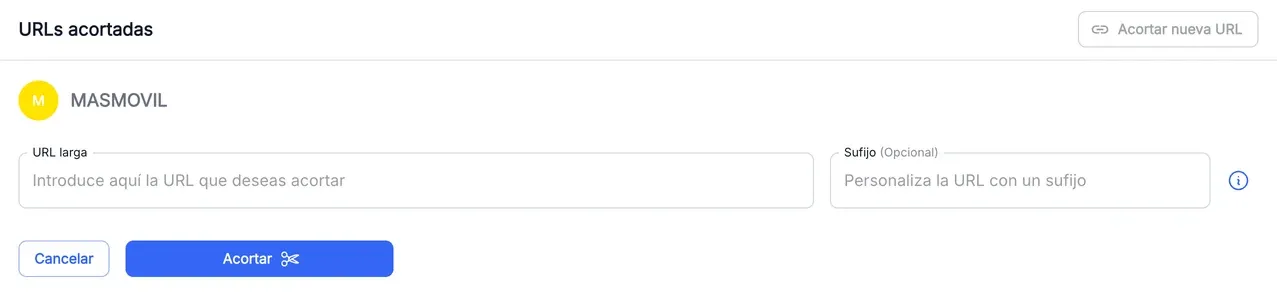
With a suffix such as mySuffix, the short URL becomes https://masmovil.link/mySuffix.
Find and copy a short URL
The Shortened URLs table is ordered from newest to oldest.
- Filter by Short URL, Long URL, Custom suffix, Update date or Update user. In Update user, My URLs shows only the ones you created or last edited.
- Hover a short URL and press the copy button to put it on the clipboard. Pressing the URL opens it in a new tab.
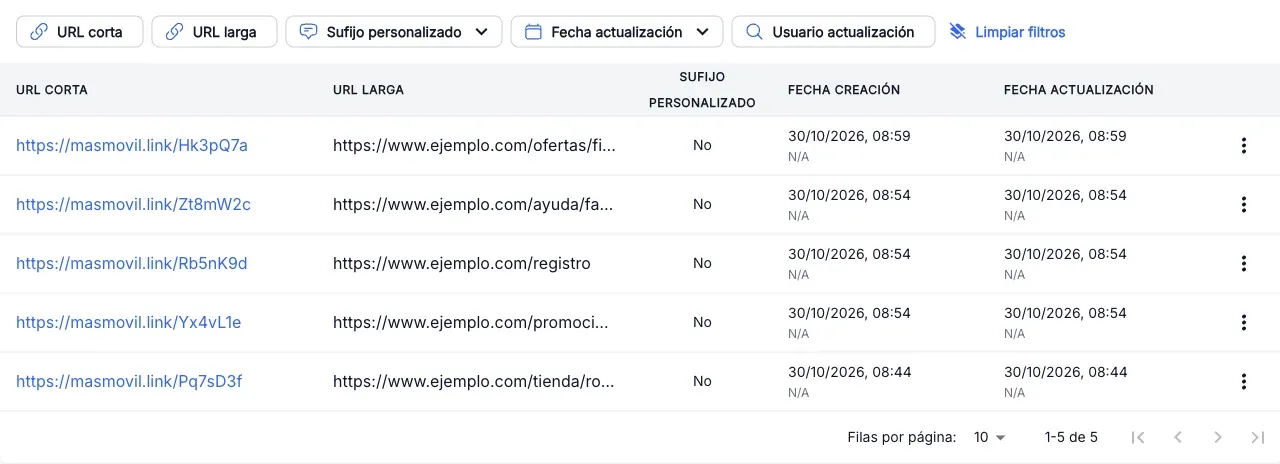
The New tag is only shown until you leave the page.
Change where a short URL points
- In the row of the URL, open the ⋮ menu and press Edit.
- In Edit URL:, type the new Long URL.
- Press Accept. You see “The URL has been successfully edited”.
The short URL does not change: whoever opens it reaches the new destination. The suffix cannot be edited.
The screenshots show the Admin interface in Spanish.
When something is not as expected
| You see | What it means and what to do |
|---|---|
| The Long URL field turns red and the form is not sent | The address is not a full URL. Check that it starts with http:// or https://. |
| ”Invalid URL provided” | The service does not accept the URL. Check it and try again. |
| ”Only basic alphanumeric characters should be used for the custom suffix” | The suffix has spaces, accents or other symbols. Use only unaccented letters and digits. |
| ”The custom suffix is already in use” | Another short URL uses that suffix. Pick another one or leave it empty. |
Reference
| Column | What it is |
|---|---|
| Short URL | The URL you share. It has a button to copy it. |
| Long URL | The address the short URL leads to. |
| Custom suffix | Yes if the end of the short URL was chosen by hand; No if it was generated. |
| Creation date | When it was created and who created it. |
| Update date | When it was last changed and who changed it. |